


🔥LAST DAY 49% OFF - 🛠️🔥2026 All-New Upgraded Model🔥Multifunctional Cabinet Door Installation Aid🛠️
🔥LAST DAY 49% OFF - 🛠️🔥2026 All-New Upgraded Model🔥Multifunctional Cabinet Door Installation Aid🛠️
Couldn't load pickup availability

🔥LAST DAY 49% OFF - 🛠️🔥2026 All-New Upgraded Model🔥Multifunctional Cabinet Door Installation Aid🛠️


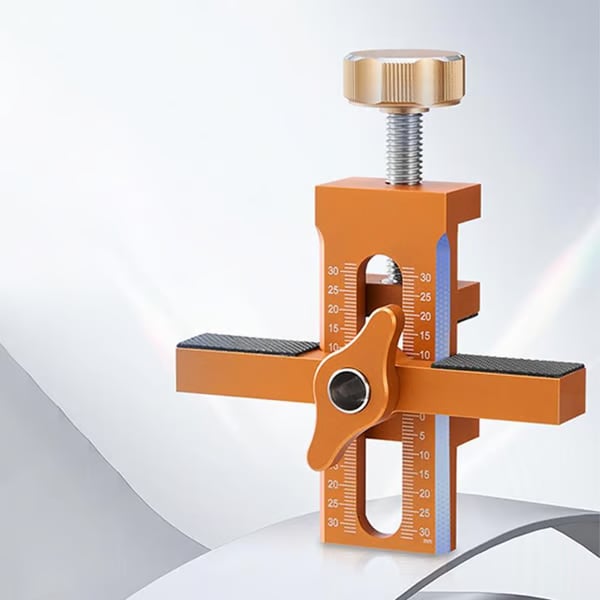
The Extra Hand Your Cabinet Install Was Missing.
Support the door, set a repeatable position and free both hands for installation — without trying to balance the cabinet door while working at the same time.
- ✓ Supports and positions cabinet doors while you work
- ✓ Dual scales help repeat a consistent position across multiple doors
- ✓ Wide base, non-slip pads and aluminum-alloy construction

The Screws Aren't the Hard Part. Holding Everything in Position Is.
A cabinet door needs to be supported, aligned and kept at the right position while you secure it. Trying to do all of that at once is where the frustration starts.
One Hand Is Holding the Door
That leaves you trying to position hardware, handle the drill and keep the panel from moving at the same time.
One Door Ends Up Higher
Small positioning differences become obvious when several cabinet doors are installed side by side.
Measure. Adjust. Measure Again.
Repeating the same setup for every door can quickly turn a simple installation into a slow job.

Support the Door. Then Use Your Hands for the Job.
The support arms create a reference point beneath the cabinet door, helping hold it at the position you set while you secure the hardware.
Use your hands for the drill, screws and hardware instead of constantly supporting the door.
Use the marked scale to establish the door position before installation.
Tighten the adjustment mechanism to help maintain the selected position while you work.
Three Cabinet Jobs. One Compact Tool.
The Pro configuration combines door positioning with a removable support base and a built-in guide for push-to-open hardware positioning.
Wall Cabinet Door Positioning
Clamp the jig to the cabinet structure and use the support arms as a repeatable reference while positioning the door.
Base Cabinet Support
The wider removable base increases the support area when working with lower cabinet installation positions.
Push-to-Open Hole Positioning
The integrated guide can assist with positioning the mounting point for compatible rebound or push-to-open hardware.
Clamp. Set. Support. Install.
The entire idea is to make cabinet-door positioning more repeatable before you start driving the final screws.
Secure the tool to a compatible cabinet panel using the top adjustment knob.
Move the support section to the position you need and use the scale as your reference.
Tighten the center locking control so the selected position stays consistent.
Rest the cabinet door against the padded support and secure your hinges or mounting hardware.


Set the Position. Then Repeat It.
When several cabinet doors sit next to one another, small differences in height become easy to notice. The dual scale gives you a visible reference that can help reproduce the same setup as you move from one cabinet door to the next.
A much cleaner workflow than starting from zero every time.
Small Details That Make the Tool Easier to Work With.
Instead of adding features just to make the specification list longer, each part has a practical role while positioning or installing cabinet doors.

Rigid metal construction creates a solid positioning platform for repeated workshop use.
Padded contact areas improve grip while helping protect cabinet surfaces.
Visible reference marks make it easier to reproduce the same setting.
The removable structure makes the jig easier to adapt and store with your other tools.
A Wider Base Changes How the Tool Can Be Used.
The Pro configuration adds a larger base plate, giving the tool a broader supporting surface for lower cabinet installation situations. That turns the jig from a simple hanging-door positioner into a more versatile cabinet-installation aid.

Clamp It Securely Before You Start.
The top screw adjustment lets the jig open and close around different cabinet-panel thicknesses while the contact pads help maintain grip.
Installing by Hand vs. Using the 3-in-1 Pro
You can install a cabinet door without a positioning jig. The question is how much of the job you want your own hands to do at the same time.
- • One hand may be occupied supporting the door
- • Easier to shift the panel while fastening hardware
- • Re-measuring may be needed between doors
- • Consistent height depends heavily on manual positioning
- • A second person can make the process easier
- ✓ Creates a support point beneath the door
- ✓ Helps keep your hands available for installation
- ✓ Scale provides a repeatable reference position
- ✓ Locking adjustment helps maintain the selected setting
- ✓ Built for a more controlled single-person workflow
Kitchen. Bathroom. Wardrobe. Same Alignment Problem.
Wherever cabinet doors need to sit at a consistent position, a repeatable support reference can make the installation easier to control.

Useful when replacing or installing multiple cabinet doors in a row.
Create a repeatable reference while installing vanity cabinet doors.
Helpful for furniture doors that need consistent positioning.
A practical addition to home improvement and cabinet-building projects.

You Don't Need Three Hands. You Need a Better Setup.
Whether you're replacing a few kitchen doors or working through a larger cabinet project, the goal is the same: support the door, establish the position, then install the hardware without fighting the panel at the same time.
Add 3-in-1 Pro to Your Toolbox ↑
Frequently Asked Questions
The practical details worth checking before adding the jig to your toolbox.
What is the 3-in-1 Pro designed to do?
Can it make installing cabinet doors by myself easier?
How does it help keep multiple doors aligned?
What cabinet-panel thickness can it clamp?
Will the jig damage my cabinet surface?
What is the tool made from?
Can it be used on both left-opening and right-opening cabinet doors?
Is this a concealed-hinge cup-hole drilling jig?
What is the wide base used for?
Can professionals use it too?
Do I still need to check the final alignment?
Are there any precautions when drilling?
Hold It. Align It. Install It.
Give the door a stable reference point, keep your hands available for the actual installation, and make repeat positioning easier from one cabinet to the next.
Choose 3-in-1 Pro ↑